Client secret credential type is straight forward in Power Automate, you only need to grab the secret value, paste it in the right field and you are good to go!
For Certificate credentials, you need an additional step for the Pfx field value – it is simple to complete though. Let’s see how we can get this set up!
1. Make sure that you have generated the certificate and that you know its location (generally it’s C:\WINDOWS\system32\{your-cert}.pfx).

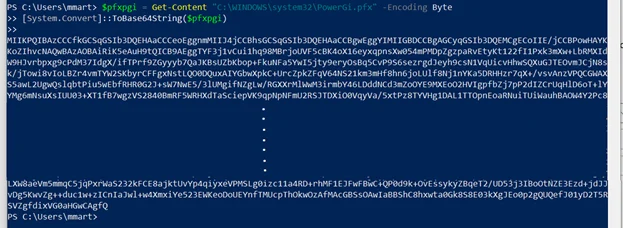
2.Once you have generated your .fpx file, open PowerShell and execute below script:
$pfxpgi = Get-Content "C:\WINDOWS\system32\{your-cert}.pfx" -Encoding Byte
[System.Convert]::ToBase64String($pfxpgi)
3. Once you hit enter, you’ll see a very long string, make sure to copy it and paste it into the Pfx field.
4. Finally, just write your certificate password in the Password field and your final result should look as follows:

If you’re working with enterprise automation and require expert guidance, Microsoft Power Automate Beratungsdienste can help streamline and optimize your workflow integrations.
And this is it!
If you would like to see full explanation of how to set up an API in Azure that needs certificate credential type and how to use it in the HTTP card make sure to look to the our video below!
Important note:
Copying and pasting the string from PowerShell is not the most secure way of approaching a production / long-term solution. Azure offers a way of storing sensitive information and credentials, using Azure Key Vault, you can connect to this service from Power Automate so it’s a perfect match! It is a Premium connector but make sure to take a look!

For organizations aiming to enhance operational efficiency with automation, collaborating with industry experts can be invaluable. Our Microsoft Power Platform consulting services are designed to tailor Power Automate solutions specifically to your business needs, ensuring seamless integration and optimal results.