
Dynamic approval requests in Power Automate

Send approval requests to different approvers | Dynamic Approvals in Power Automate

This post and video will show how to Create Dynamic Approvals in Power Automate. This approach is useful to implement flexible, maintenance-friendly approval workflows using all the Microsoft 365 toolkit. For this example, we’re working with SharePoint lists but the same logic can be applied regardless of the data source being referenced – eg. SQL or Dataverse.

Inhaltsverzeichnis

Anwendungsfallbeschreibung

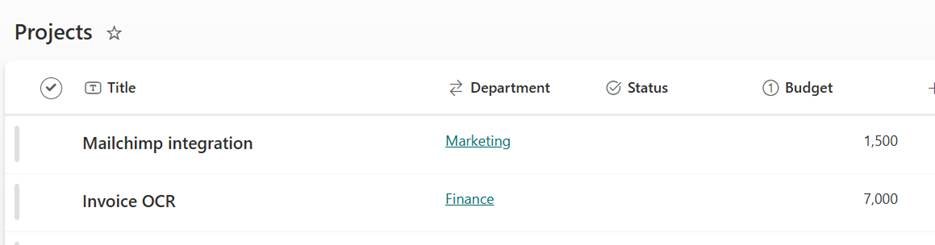
We have a “Projects” list, and the requirement is to assign approval requests based on the department linked to each project record.
Automatisieren Sie Aufgaben, die Sie verlangsamen

Geben Sie Ihrem Team mehr Zeit und ermöglichen Sie ihm, sich auf strategische Aufgaben zu konzentrieren, dank digitaler und robotergestützter Automatisierung.

A screenshot of a computerAI-generated content may be incorrect.

For this, we need  a list or table that has the list of the departments and the approvers for each of them.
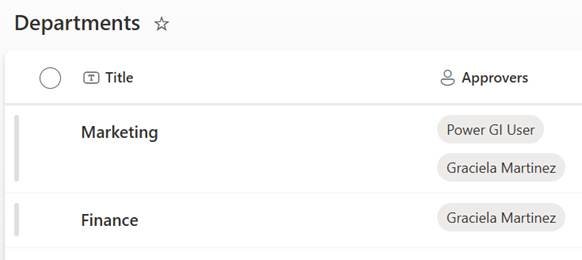
A screenshot of a computerAI-generated content may be incorrect.


For above examples, the Marketing projects should go to Power GI user and Graciela. Finance should only go to Graciela.

Lösungsbeschreibung

  • Create a SharePoint list that has a list of all departments and a column for the required for each approval request.
  • Create a Power Automate workflow that runs every time a new record is created in the Projects list.
  • Get the related department record by using SharePoint connector, to bring the list of approvers.
  • Use the Select action in Power Automate to only return the email text into an array and convert it to text by using the “join” function.
  • Send the approval request based on the result of the Select action + Join function.
  • Process the results (approve, reject).

The above setup ensures that approval
notifications are sent only to the relevant users in the correct departments,
supporting both single and multiple approvers per department.

Discover how our Microsoft Power Platform consulting services simplify complex processes and enhance efficiency. Whether you’re seeking to streamline approval workflows or unlock new functionalities with Power Automate, our expertise transforms your ideas into impactful digital solutions.

Ist Ihr Unternehmen bereit für die Automatisierung?

Automatisieren Sie Prozesse mit der Microsoft Power Platform.

Schritt-für-Schritt-Anleitung

Watch the video below to see a step-by-step walkthrough of the process of creating a dynamic approval workflow in Power Automate

How our Power Automate and Power Platform consulting services can help you

This is a very simple and extremely powerful concept that can be implemented in scenarios of various complexity levels, whether the approval rules only depend on department or on more criteria. Using our Power Automate und Power Platform Beratungsleistungen, haben wir es bereits vielfach für verschiedene Kunden implementiert. Wenn Sie Hilfe beim Aufbau robuster und dynamischer Genehmigungsworkflows wünschen, Kontaktieren Sie uns, Wir würden uns sehr freuen, uns mit Ihnen unterhalten zu können und zu sehen, wie wir Ihr Team unterstützen können.

Autor
Power Platform Berater | Experte für Geschäftsprozessautomatisierung
Microsoft Certified Power Platform Berater und Lösungsarchitekt mit über 4 Jahren Erfahrung in der Nutzung von Power Platform, Microsoft 365 und Azure, um kontinuierlich Automatisierungsmöglichkeiten zu entdecken und Prozesse neu zu gestalten.