Inhaltsverzeichnis
We have two tables in our data model, Waybill Header and Waybill Item Detail, these two tables are related by “Waybill Header ID”.
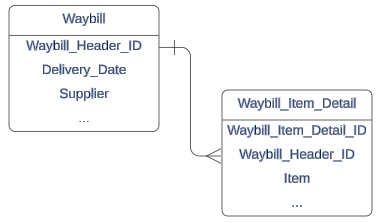
Table relationships are usually indicated in Dataverse through Lookup Columns, so for this scenario we would need to add a lookup in table Waybill Item Detail against Waybill Header to indicate that one header can have one or more details. This is a fundamental aspect of Power Platform consulting when working with relational data models.
Now the next question is: how do we work with these Lookup columns in Power Automate? With Microsoft Power Platform consulting services, you can optimize this process for better efficiency.
Table and column names
When a relationship is created and if we want to filter rows by this relationship, or add /edit rows we will need to know the table’s set name and the column’s logical name.
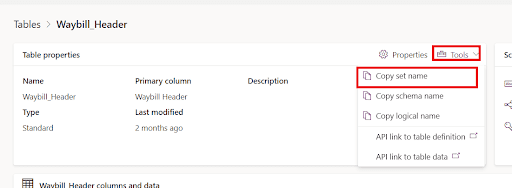
Table set name
We can get the table set name by opening the table in the Dataverse portal, then clicking on “tools” and finally clicking on “copy set name”
Lookup column logical name
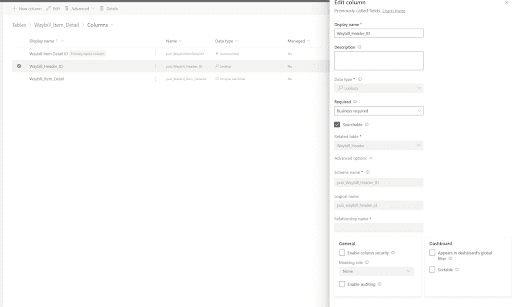
We can get the column logical name by opening the table in the Dataverse portal, and then just locating our column in the list

Click on the column name, then expand the advanced options and the logical name can be found there:
Now that we have the names we need, we are ready to perform operations with this relationship in Daten-Verse!
“In the realm of digital platform consulting, understanding and managing data relationships is crucial. Our Power Platform Beratungsleistungen can help you seamlessly integrate Dataverse and Power Automate to enhance your data management capabilities. By leveraging the logical names of your tables and columns, you unlock potential efficiencies in your processes.”
Get Rows and Filter Query Field
We will need the lookup columns logical name for this operation (pub_waybill_header_id).
If you want to get the details rows that belong to the header table, we will need the “List rows in a table” action, just select the details table and in the filter rows query write the following:
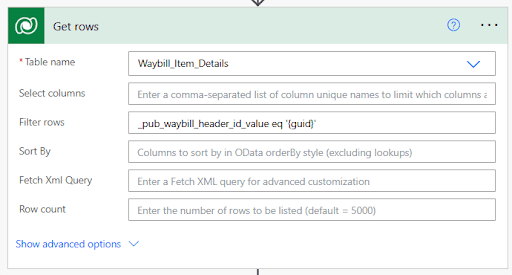
_{lookup_column_logical_name}_value eq {guid}
The structure for this filter is always as follows:
- Start with “_”
- Write column’s logical name
- Finish with _value
End result:
_pub_waybill_header_id_value eq ‘{guid}’
Note: the single quotes are optional
Now you’re ready to filter your tables in Dataverse using relationship columns!
Create and edit rows
We will need the table’s set name for this operation (pub_waybill_headers).
If you want to add or edit a row in the details table that makes reference to the header table, we will need to use the “Create row” or “Edit row” actions. Once selected, you will be prompted with all the fields needed to create a row in the selected table.
Locate the field that belongs to the lookup column and write the following
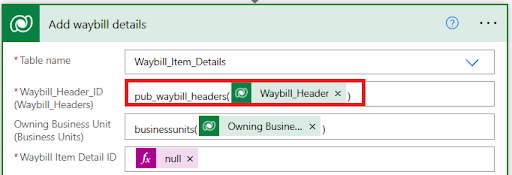
{table_set_name}({guid})
The structure for this operation is always as follows:
- Start with table’s set name
- Open parenthesis
- Write header’s GUID (unique identifier)
- Close parentesis
End result:
pub_waybill_headers({guid})
Note: do not add single quotes!
Now you can add and edit rows that include lookup columns!
Conclusion
Using lookup columns in Dataverse with Power Automate is easy with the right steps. By identifying table set names and logical column names, you can filter, add, and edit rows seamlessly. Contact Power GI if you’re working with Dataverse and Power Automate!